Cross-Platform Engineering in Rust
Part 2 of the Orbiter technical series. See also: Introducing Orbiter.
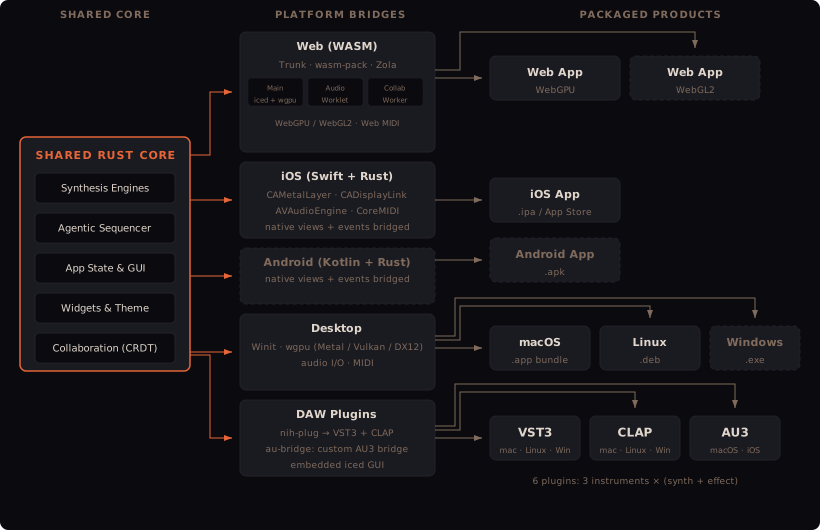
Orbiter ships as a browser app, a standalone desktop app (macOS, Linux, Windows), an iOS app, an Android app, and six DAW plugins (VST3, CLAP, AU3) — all from one Rust codebase. This post is about how and why.
What Made This Practical
A few things converged to make this level of cross-platform reach feasible for a solo developer:
- Rust's compilation model — the same code compiles to native binaries, static libraries for C FFI, dynamic libraries for JNI, and WASM, with no runtime or garbage collector to adapt. The C ABI means interop with Swift, Kotlin, and JavaScript is straightforward.
- wgpu — a single GPU abstraction over Metal, Vulkan, DX12, WebGPU, and WebGL2. WebGPU is now shipping in major browsers, making this a practical choice. One rendering path for every platform.
- iced — a GPU-rendered GUI framework with no platform dependencies beyond wgpu. The same widget tree runs everywhere.
- Agentic development tools — maintaining five platform bridges, each with its own FFI contract and build system, would be impractical to do entirely by hand. AI-assisted development made it feasible to write and maintain the bridge code, build scripts, and CI workflows at a pace one person could sustain.
None of these individually is sufficient. The combination is what makes it work.
The Landscape of Alternatives
If you're building cross-platform audio software, there are several established approaches. Each makes different trade-offs around licensing, language, platform reach, and web support.
C++ Frameworks
JUCE is the industry standard. It's mature, well-documented, and has a huge community. But its licensing model is layered — free under GPL (your project must also be GPL), or paid tiers with revenue thresholds ($50K for Personal, $200K for Indie at $40/month, unlimited at Pro for $130/month). After the PACE acquisition in 2022, there's been recurring community concern about licensing stability. On the web, JUCE has experimental Emscripten support but it's not a first-class target — binaries are large, browser API integration is manual, and plugin formats don't translate to the web.
iPlug2 has an excellent permissive licence (WDL/zlib) and notably good web support via Web Audio Modules (WAM). It covers VST2/3, AU, AUv3, AAX, and standalone. The GUI framework (IGraphics) is less feature-rich than JUCE's, and the community is smaller, but the licensing and web story are genuinely strong. Still C++ though, with the same WASM-via-Emscripten path.
DPF (DISTRHO Plugin Framework) is lightweight and ISC-licensed (essentially MIT). Good Linux community, supports LADSPA, LV2, VST2/3, CLAP. No mobile, no web. A solid choice for desktop plugins where JUCE is overkill.
DSL and Code Generation
FAUST takes a different approach: a functional DSP language that generates C++, Rust, WASM, or LLVM from the same source. Web support is excellent (generates AudioWorklet code directly). The GPL compiler produces code you can use under any licence. But it's a DSP authoring tool, not a full framework — you still need something else for the GUI and platform integration.
Web-First Approaches
Tauri pairs a Rust backend with a web-tech UI (HTML/CSS/JS). Much lighter than Electron (~10 MB vs 100+ MB), and v2 adds iOS/Android. But audio must be handled via native code, and there's no plugin format support. Electron has the same architecture with higher memory overhead and GC pauses that can interfere with real-time audio.
Flutter with dart:ffi can call into native Rust DSP code. Excellent mobile UI story, but Dart's garbage collector can cause audio glitches, and there's no built-in real-time audio — you're bridging to CoreAudio/AAudio yourself. No plugin format support.
Rust-Native
nih-plug is the leading Rust plugin framework — ISC-licensed, excellent ergonomics, supports VST3 and CLAP with pluggable GUI (iced, Vizia, egui). Actively maintained. It doesn't support AU/AUv3, which is why Orbiter uses a separate au-bridge for Apple platforms.
Vizia is a declarative, CSS-styled Rust GUI framework designed for audio plugins, with a nih-plug integration. Pre-1.0 but maturing. baseview provides low-level windowing for plugin UIs — the foundation that nih-plug and others build on.
Where Rust Fits
The key gap in the C++ ecosystem is the web. JUCE and iPlug2 both reach it via Emscripten, but it's a second-class experience. Rust compiles to WASM natively, and the tooling (wasm-bindgen, web-sys, Trunk) is designed for it. The key gap in the web-first ecosystem (Tauri, Electron, Flutter) is real-time audio performance and plugin formats. Rust bridges both worlds — native performance with first-class WASM support and C ABI for FFI to every platform.
The trade-off is maturity. JUCE has decades of audio UI widgets, comprehensive documentation, and a proven track record. The Rust audio ecosystem is younger and requires more custom work — especially for mobile, where iced has no built-in support. That's where the original bridging work for Orbiter came in.
GPU Rendering with wgpu
The entire UI is rendered on the GPU via wgpu, a Rust implementation of the WebGPU standard. The iced GUI framework drives the rendering, and wgpu maps to the native graphics API on each platform:
- macOS / iOS — Metal
- Linux — Vulkan
- Windows — DX12 (Vulkan fallback)
- Web — WebGPU where available, WebGL2 as fallback
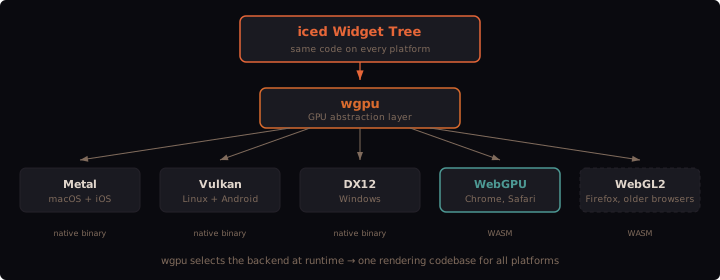
The same iced widget tree and the same rendering code runs everywhere. Two WASM builds are produced (WebGPU and WebGL2) and the correct one is loaded at runtime based on browser support. On native platforms, wgpu selects the high-performance GPU adapter by default with a low-power fallback.
Mobile: Custom iced Integration for iOS and Android
On desktop, iced runs on top of winit for windowing and event handling. On iOS and Android that's not an option — the native platform owns the window, the render loop, and the touch event system. iced has no built-in mobile support. Getting it running on iOS and Android required building custom integration layers from scratch — original work done for Orbiter (to be open sourced) that doesn't exist elsewhere in the iced ecosystem.
On iOS, Swift creates a CAMetalLayer and passes it to Rust via C FFI. Rust creates a wgpu Metal surface directly from the layer pointer, then drives iced's UserInterface manually — building, updating, and drawing each frame without winit. CADisplayLink controls the render loop from the Swift side, calling into Rust each frame and receiving a redraw flag back. When iced has nothing to update, the display link pauses. Touch events are batched by Swift into C structs (phase, finger ID, coordinates) and forwarded across FFI, where they're translated into iced touch::Event values.
On Android, the pattern is similar but via JNI instead of C FFI. A Kotlin SurfaceView provides the native window, which Rust converts to a wgpu Vulkan surface. The render loop is driven by Choreographer frame callbacks. Touch events arrive individually through JNI calls. The crate is compiled as a cdylib (shared library loaded by the Android runtime), unlike iOS where it's a staticlib linked into the app binary.
Both platforms share the same adaptive rendering strategy: a custom iced Notifier implementation that signals the native side when a redraw is needed, letting the platform pause the render loop when idle.
Toward Shared Crates
The iOS and Android integration code is currently Orbiter-specific, but the core of it — driving iced's UserInterface from a native render loop, translating touch events across FFI, managing wgpu surfaces from platform-provided GPU layers — is generic. I'm planning to extract this into standalone crates (iced-ios-bridge, iced-android-bridge or similar) that any iced project could use to target mobile. The FFI contracts are already well-defined and the architecture is deliberately minimal — the native side provides a GPU layer and touch events, Rust handles everything else.
Web: Four Threads in the Browser
The web build has the most complex threading model because browsers enforce strict separation between contexts. Four independent WASM modules run on separate threads — audio runs in an AudioWorklet for low-latency playback, while ML inference and collaboration stay off the main thread to minimise CPU contention.
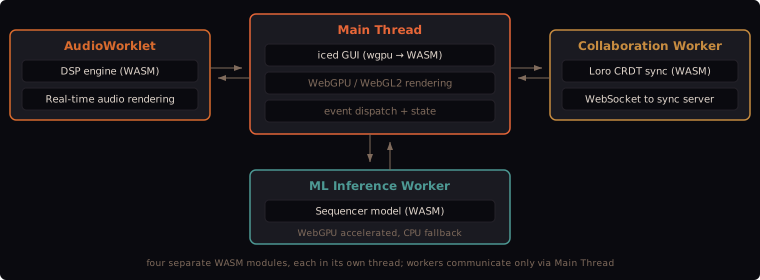
The main thread runs the iced GUI via wgpu compiled to WASM. The AudioWorklet runs the DSP engine in a dedicated audio processing thread — a separate Rust crate compiled to WASM independently. A collaboration worker handles Loro CRDT sync over WebSocket. An ML sequencer worker runs the generative model inference.
Trunk builds the WASM app, wasm-pack builds the workers, and Zola builds the static site that hosts it all. Two variants are produced — WebGPU and WebGL2 — and the correct one is loaded at runtime based on browser capabilities.
Desktop
Desktop is the most straightforward target: Winit for windowing, wgpu for rendering, cpal for audio I/O. A real-time priority thread runs the DSP, with rtrb lock-free ring buffers for UI-to-audio communication. This is the standard iced architecture with no custom embedding needed.
DAW Plugins
For producers and sound designers, the same engine runs as a plugin inside a DAW. Two plugin frameworks handle the wrapping:
- nih-plug produces VST3 and CLAP binaries. The GUI is embedded via nih_plug_iced, which hosts iced inside the plugin window provided by the DAW.
- au-bridge produces AU3 (Audio Unit v3) extensions for macOS and iOS. Each instrument is compiled as a separate Rust static library, and a Swift wrapper builds the AUAudioUnit parameter tree from metadata exported by Rust via FFI.
Six plugins total: three instruments, each available as both a synthesizer and an audio effect.
MIDI & Sync
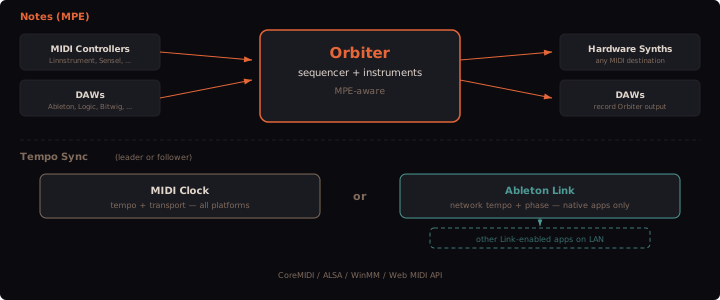
MIDI uses midir across all platforms — CoreMIDI on macOS/iOS, ALSA on Linux, WinMM on Windows, Web MIDI API in the browser. All available ports are connected simultaneously with hot-plug detection. MPE is fully supported: per-note pitch bend, pressure, and slide (CC74) control individual voice parameters through per-voice modulation.
Tempo sync supports two alternative transports: MIDI Clock (all platforms, leader or follower) and Ableton Link (native apps only, network tempo and phase sync over LAN).